Usage | 4. Data export and visualization
This notebook explains how a bike network grown by GrowBikeNet can be exported and visualized.
Parameters and settings covered: export_data, city_query, city_id, export_plots, settings.viz
We start every Usage notebook with the standard way of importing GrowBikeNet:
import growbikenet as gbn
City query is not the city name
So far the first parameter provided to GrowBikeNet was a city’s name. However, technically this parameter is not necessarily the name, but a query string used by OpenStreetMap’s search engine Nominatim to retrieve data about the city. Often this is identical to the city name, but sometimes it is not. For example, running edges_ordered = gbn.growbikenet("Athens") retrieves data for Athens, Georgia in the US. To retrieve data for Athens, Greece, the city query needs to be “Municipality of Athens”: edges_ordered = gbn.growbikenet("Municipality of Athens"). This difference in name and query has consequences for finding the right city, but also for exporting the data.
Providing a city id
Running GrowBikeNet with the parameter export_data=True will export the resulting ordered edges to a gpkg file. By default export_data is already set to True. Here we don’t even care anymore about the output edges_ordered, since the data is exported anyway.
gbn.growbikenet("Municipality of Athens", export_data=True);
The file is called municipalityofathens-growbikenet-betweenness-from_scratch-grid_square.gpkg, by default in the ./results folder. The file name is separated by hyphens into parts. The first part municipalityofathens is the city id, which is an automatically “slugified” version of the city_query parameter "Municipality of Athens". Slugification is important to turn city names with special characters such as "L'Hospitalet De Llobregat" into a string that can be part of a file name, in this case "lhospitaletdellobregat. The other filename parts show that the file came from growbikenet, and report the most important parameters: The ordering of betweenness, that the network was grown from scratch from_scratch, and the seed_point_type being grid_square.
To provide a name for the file that corresponds better with the city name, a city_id can be provided:
gbn.growbikenet(
    "Municipality of Athens",
    export_data=True,
    city_id="athens",
);
This creates the better filename athens-growbikenet-betweenness-from_scratch-grid_square.gpkg.
Generating plots
Setting export_plots=True, GrowBikeNet allows exporting the growing network as plots, one plot per growth step:
gbn.growbikenet("Municipality of Athens", export_plots=True);
The results are saved by default in the folder ./results/plots/ordering_[ordering], where [ordering] is the ordering parameter, here betweenness.
By default the plots look like this - showing 3 growth steps:
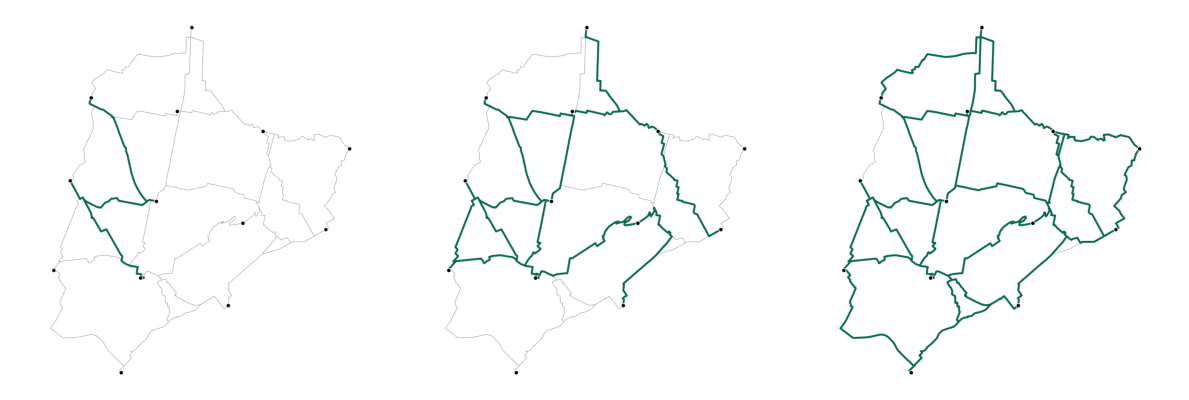
The appearance can be modified in many ways using the settings.viz. Its default values are:
gbn.settings.viz
{'bike_to_grow': {'color': '#999999', 'line_width': 0.75},
 'bike_grown': {'color': '#096a51', 'line_width': 3},
 'bike_existing': {'color': '#9999cc', 'line_width': 2},
 'seed_point': {'color': '#000000', 'edgecolor': '#FFFFFF', 'markersize': 40},
 'dpi': 150,
 'crs': 'auto'}
For example:
gbn.settings.viz["bike_to_grow"]["color"] = "#000000"
gbn.settings.viz["bike_to_grow"]["line_width"] = 1
gbn.settings.viz["bike_grown"]["color"] = "#FF0000"
gbn.settings.viz["bike_grown"]["line_width"] = 5
gbn.settings.viz["seed_point"]["markersize"] = 0
gbn.growbikenet("Municipality of Athens", export_plots=True);
show_3_plots()
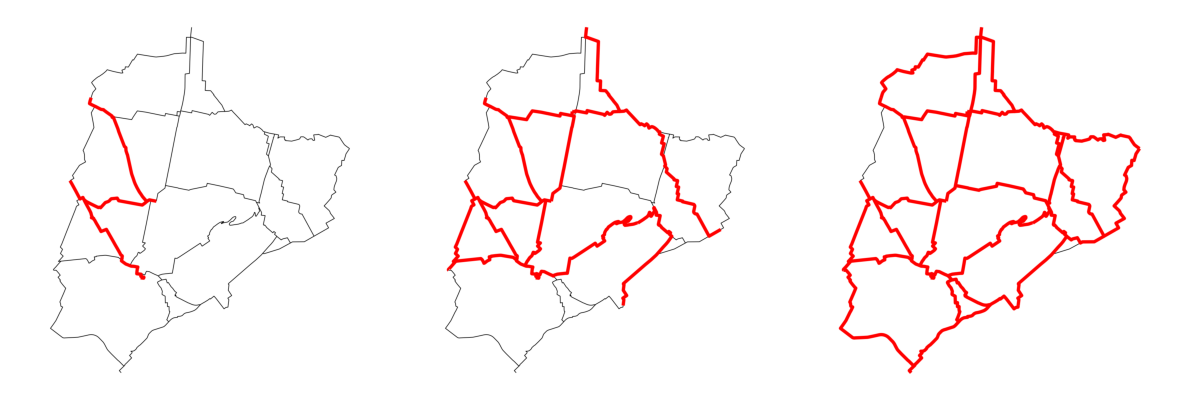
Generating videos
The generated plots can be used as frames for a video. Due to packaging issues with Windows, video generation is not part of the official growbikenet conda package, but we provide a script which you can run to generate a video from the plots: https://github.com/BikeNetKit/GrowBikeNet/blob/main/examples/generate_video.py
It requires the extra dependency of cv2 (OpenCV) which can be installed on most operating systems via: pip install opencv-python
To use it, first set the parameters inside the script (ordering, folder, fps), then run it via python generate_video.py.